I Reverse-Engineered Keihan Railway's Live Train Position Page and Built an Unofficial Train-Tracking Library
 部員1
部員1
This article is a rewrite, for public release, of an independent research report I originally wrote for a social studies inquiry course in my third year of junior high school.
Introduction
⚠️ The API discussed in this article is not officially provided or published by Keihan Electric Railway. It's the result of analyzing JSON that is loaded internally by a public web page. The specification can change without notice, and there are restrictions on secondary use (see "Notes and Disclaimer" at the end). Please read this purely as a technical investigation record.
The starting point was wanting to build digital signage that shows which train is coming when leaving school, since the walk between the nearest station and the school building is about 1.5 km. To do that, I first need to obtain, in a machine-readable form, where trains currently are.
Keihan Railway has a page called Train Position that shows train locations on a route map in real time. Of course, there isn't a documented, publicly available API that tells you "which train is coming next to station XX." So I analyzed, from the browser, how this page fetches its data, and compiled the results into a Python library called keihan_tracker .
This article covers that investigation process, and especially the "calculating the next stop" problem that gave me the most trouble. I hope it's useful to others who want to analyze the internal APIs of public web pages in a similar way.
Finding the Endpoints
The approach is simple: just use Chrome DevTools to find the endpoints the page is hitting behind the scenes.
- Open the "Train Position" page
F12to open DevTools, then go to the Network tab- Filter to Fetch/XHR only
- Reload the page
This shows only the files being fetched via JavaScript's fetch . The following JSON files were loaded from Keihan's page.
| Endpoint | Role |
|---|---|
select_station.json | Station list per line (station numbers, names, multiple languages) |
startTimeList.json | Stop stations and times per train (schedule) |
transferGuideInfo.json | Transfer line info per station |
trainPositionList.json | Position, type, and delay per train in service |
Of these, only trainPositionList.json has real-time characteristics; the station list and schedule stay close to static data. The library also fetches the station list and schedule only once, and updates only the position data via polling. Here's roughly what it looks like inside:
{
  "delay": "",
  "delayEn": "",
  "delayKo": "",
  "delayZhCn": "",
  "delayZhTw": "",
  "locationCol": "4",
  "locationRow": "64",
  "trainDirection": "1",
  "trainIconTypeImageJp": "JP21_0_0_Pre_D.png",
  "trainInfoObjects": [
    {
      "carsOfTrain": "8",
      "delayMinutes": "",
      "delayMinutesEn": "",
      "delayMinutesKo": "",
      "delayMinutesZhCn": "",
      "delayMinutesZhTw": "",
      "destStationCode": "1",
      "destStationNameEn": "Yodoyabashi",
      "destStationNameJp": "淀屋橋",
      "destStationNameKo": "요도야바시",
      "destStationNameZhCn": "淀屋桥",
      "destStationNameZhTw": "淀屋橋",
      "destStationNumber": "01",
      "lastPassStation": "21",
      "trainNumber": "0807",
      "trainTypeEn": "Limited Exp.",
      "trainTypeIcon": "JP21_0_0_Pre_D.png",
      "trainTypeJp": "特急",
      "trainTypeKo": "특급",
      "trainTypeZhCn": "特急",
      "trainTypeZhTw": "特急",
      "wdfBlockNo": "246"
    }
  ],
  "trainTypeVisIconVis": "EN21_0_0_Pre_D.png"
}, ...
Here's roughly what the schedule data, startTimeList.json, looks like:
{
  "fileCreatedTime": "20260706190215",
  "fileVersion": "1.0.0",
  "TrainInfo": [
    {
      "wdfBlockNo": "1",
      "extTrain": "0",
      "premiumCar": "0",
      "trainCar": "13016",
      "diaStationInfoObjects": [
        {
          "stationNumber": "401",
          "stationDepTime": "-",
          "stationNameJp": "三条",
          "stationNameEn": "Sanjo",
          "stationNameZhTw": "三條",
          "stationNameZhCn": "三条",
          "stationNameKo": "산조"
        },
        {
          "stationNumber": "392",
          "stationDepTime": "05:42",
          "stationNameJp": "祇園四条",
          "stationNameEn": "Gion-shijo",
          "stationNameZhTw": "祇園四條",
          "stationNameZhCn": "祇园四条",
          "stationNameKo": "기온시조"
        },
        {
          "stationNumber": "372",
          "stationDepTime": "05:44",
          "stationNameJp": "七条",
          "stationNameEn": "Shichijo",
          "stationNameZhTw": "七條",
          "stationNameZhCn": "七条",
          "stationNameKo": "시치조"
        },
        {
          "stationNumber": "330",
          "stationDepTime": "99:99",
          "stationNameJp": "龍谷大前深草",
          "stationNameEn": "Ryukokudai-mae-fukakusa",
          "stationNameZhTw": "龍谷大前深草",
          "stationNameZhCn": "龙谷大前深草",
          "stationNameKo": "류코쿠다이마에 후카쿠사"
        },
        {
          "stationNumber": "301",
          "stationDepTime": "05:50",
          "stationNameJp": "丹波橋",
          "stationNameEn": "Tambabashi",
          "stationNameZhTw": "丹波橋",
          "stationNameZhCn": "丹波桥",
          "stationNameKo": "단바바시"
        },...
Locking Down the JSON with Types
Treating raw JSON as a plain dict leads to more and more accesses like data["locationObjects"][0]["trainInfoObjects"][0]["delayMinutes"], and you lose any way to notice a typo'd key name or a structural change on the API's side. So I defined models with Pydantic and made sure fetched JSON is always validated before use.
For example, here's roughly how a single train's worth of trainPositionList.json gets mapped into a model (partial excerpt).
from pydantic import BaseModel, model_validator
class trainInfoObject(BaseModel):
    wdfBlockNo:       int   # internal train management number
    carsOfTrain:      int   # number of cars
    delayMinutes:     str   # delay (e.g. "About 5 min")
    destStationCode:  int   # destination station code
    destStationNameJp: str  # destination (Japanese)
    lastPassStation:  int   # <- the troublemaker discussed below
    trainNumber:      str   # train number
    trainTypeJp:      TrainType  # type (converted to Enum)
    is_special:       bool  # whether it's a special/extra train
Adding types means editor autocomplete works, and if the API returns an unexpected value, a validation error catches it immediately. When handling external data in a dynamically-typed language like Python, I think this "validate at the entry point" pattern is close to mandatory.
The type field (trainTypeJp) is converted into an Enum rather than kept as a raw string. Extra/special trains have "臨時" (extra) prepended to the type name per the spec, so inside the validator I set a flag and strip out that extra text.
    @model_validator(mode="before")
    @classmethod
    def check_type_special(cls, d: dict):
        if "臨時" in d["trainTypeJp"]:
            d["is_special"] = True
            d["trainTypeJp"] = d["trainTypeJp"].replace("臨時    ", "")
        else:
            d["is_special"] = False
        return d
For networking, I use httpx's async client. Anticipating that this would eventually be called from the signage backend (FastAPI), I designed it around async/await from the start.
The Main Challenge: How to Determine the "Next Stop"
This is the part that gave me the most trouble.
What the signage needs to show when leaving school is "which train is arriving at the nearest station, and in how many minutes." To do that, I need to extract, from all the trains currently running, the ones "whose next stop is the nearest station." In other words, nothing works unless the "next stop" is determined for every train.
Trap 1: lastPassStation Can't Be Trusted
The first thing I focused on was a parameter called lastPassStation. Going by the name, it looks like "the last station passed," and if you know that, it seems like you should be able to derive the next station too.
Testing it at Korien Station, this value did indeed seem to point to "the station currently stopped at, or the next station to stop at." But when I tried to get "the next train to stop at this station" for a different station, trains that should have appeared didn't show up at all.
Reading through the JavaScript on the "Train Position" page, also with help from Google AI Studio, revealed the cause. This parameter is an internal value used as the basis for deciding which station a train's detail view starts displaying stop times from, and it isn't strictly managed as "the last station passed." It just happened to behave as expected at Korien; at least on the local-stop segment between Kyobashi and Kayashima, it returns the value of whatever major station precedes it — Kayashima, Kyobashi, Moriguchi-shi, and so on.
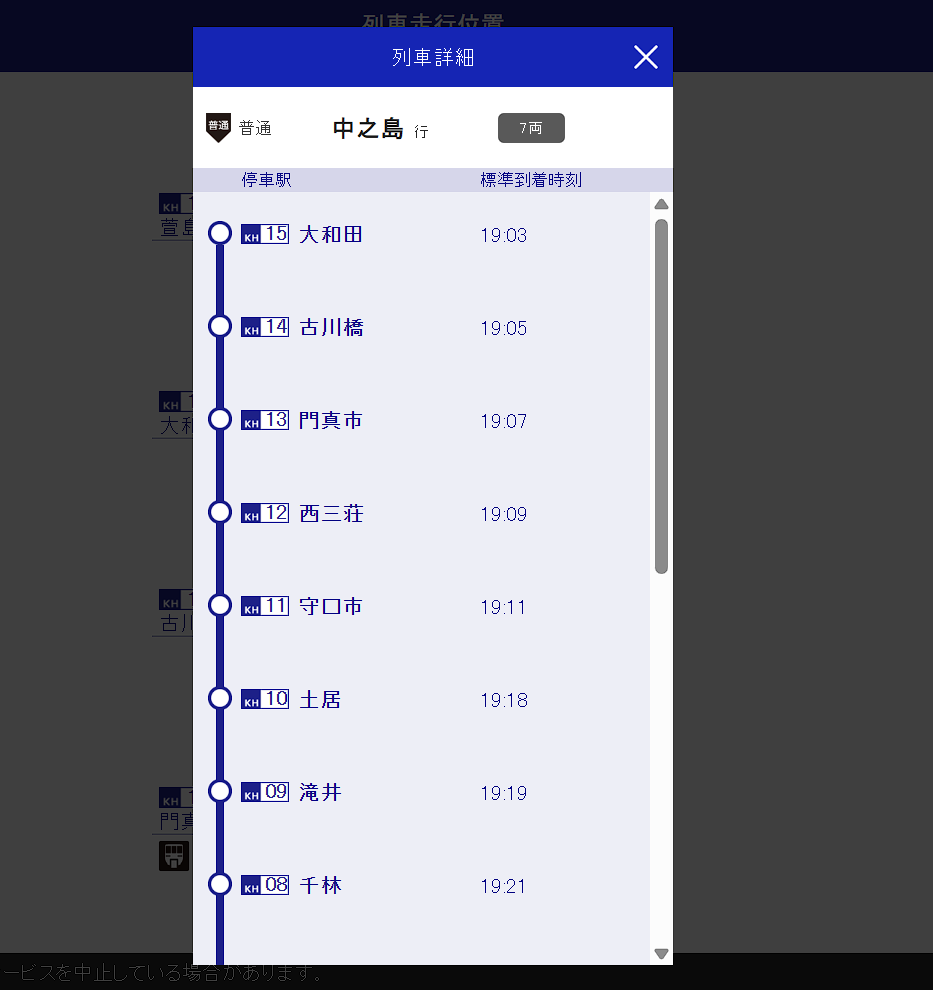
This screenshot is of a local train running between Ōwada (KH15) and Furukawabashi (KH14); because lastPassStation is 16 (Kayashima Station), the display starts from the estimated arrival time at Ōwada — a station the train should have already passed.
For the project's purposes, it would have been fine to leave this alone as long as it worked at Korien or Neyagawa-shi, but considering that a future spec change could break it at Korien too, I decided to calculate it with separate logic instead. The library still keeps the lastpass_station property, but explicitly marks it as deprecated.
Trap 2: Deriving the Station from Coordinates
The next thing I used was the locationCol / locationRow parameters. These are coordinates for rendering the route map as a grid, and they're really meant for determining display position. Still, they were effectively the only thing usable as position data.
Keihan's route map is a vertical grid, and the range of the row value roughly determines the line and station. For example, on the regular sections of the Main Line and Ōtō Line, three rows correspond to one station block, and the position within the block (top/middle/bottom) determines whether the train is "stopped" or "moving toward the next station." I built the coordinate-to-station-segment conversion logic through what's often called "vibe coding." Roughly, it's structured like this.
def calc_position(col: int, row: int):
    """Given coordinates, return the stopped station number, or the two stations for a train in transit"""
    # 1. Determine the line from the row range
    if 1 <= row <= 131:
        line = "京阪本線・鴨東線"  # (the Nakanoshima Line branch is handled separately)
    elif 132 <= row <= 153:
        line = "宇治線"
    elif 154 <= row <= 175:
        line = "交野線"

    # 2. On regular Main Line sections, 3 rows = 1 station block
    if row <= 117:
        block_index = (row - 1) // 3
        current_station = 42 - block_index      # counting backwards from KH42 Demachiyanagi
        pos_in_block = (row - 1) % 3            # 0: stopped, otherwise: moving
        if pos_in_block == 0:
            return (line, current_station, None)        # stopped
        else:
            return (line, current_station, current_station - 1)  # moving
    ...
However, the underground section (Tenmabashi–Yodoyabashi, and the Nakanoshima Line) is packed tight with no gaps on the route map, so the normal block calculation doesn't work there; I handled it by hardcoding individual stations to specific row ranges. This part depends entirely on how Keihan happens to draw its route map, so there was no way around doing it the ugly way.
Trap 3: You Can't Reach the Next Station by +1/-1 on the Station Number
Once you know the segment a train is in, you can get the next stop by searching, in the direction of travel, for "the first station that appears in the stop-station list." At first I simply tried searching by incrementing/decrementing the station number by +1 / -1.
This works fine on the Main Line's continuous stretches, but it breaks down at junctions where the station number jumps. Keihan's station numbering is assigned per line, so:
- The Nakanoshima Line (KH51–KH54) connects to Tenmabashi (KH03) on the Main Line
- The Katano Line (KH61–KH67) connects to Hirakatashi (KH21)
- The Uji Line (KH71–KH77) connects to Chushojima (KH28)
In other words, the numbering jumps discontinuously at connecting stations. With a naive increment-based approach, you can't correctly follow a transition like going from Tenmabashi (No. 3) to Naniwabashi (No. 51) on the Nakanoshima Line.
So I dropped the number-based search and switched to defining the actual station order per line as an array. That's stations_map.py.
KYOBASHI_TO_DEMACHIYANAGI = [i for i in range(4, 42 + 1)]

UJI_UP        = [77, 76, 75, 74, 73, 72, 71, 28]
KATANO_UP     = [67, 66, 65, 64, 63, 62, 61, 21]
HONNSEN_UP    = [1, 2, 3]              + KYOBASHI_TO_DEMACHIYANAGI
NAKANOSHIMA_UP = [54, 53, 52, 51, 3]  + KYOBASHI_TO_DEMACHIYANAGI
Looking at NAKANOSHIMA_UP's [54, 53, 52, 51, 3, 4, 5, ...], you can see that even the discontinuous connection where Naniwabashi (No. 51) is followed by Tenmabashi (No. 3) is represented simply as "the next element" in the array. By keeping order instead of numbers, you can walk to "the next element" without worrying about jumps at connection points.
Here's the final logic for calculating the "next stop."
def next_stop_station(self):
    next_station = self.next_station.station_number
    stop_stations = [s.station.station_number for s in self.stop_stations]

    # 1. Get the station-order list for the line
    line = {
        "中之島線": NAKANOSHIMA_UP,
        "交野線":   KATANO_UP,
        "京阪本線・鴨東線": HONNSEN_UP,
        "宇治線":   UJI_UP,
    }[self.line]

    # 2. Reverse the list if heading down (outbound)
    if self.direction == "down":
        line = list(reversed(line))

    # 3. If the current location is already a stop station, return it
    if next_station in stop_stations:
        return self.master.stations[next_station]

    # 4. Search forward through the list and return the first station that's in the stop list
    index = line.index(next_station)
    for i in range(index, len(line)):
        if line[i] in stop_stations:
            return self.master.stations[line[i]]
    return None
To summarize the flow:
- Determine the line and direction (inbound/outbound) currently being traveled, from the coordinates
- Get the station-order list for that line (reversed for outbound)
- Find the current location's index in the list
- From there, take the first station that appears in that train's stop-station list as the "next stop"
With this, even trains crossing a junction between lines now get the correct next stop.
Merging the Schedule with Position Data
trainPositionList.json (running position) and startTimeList.json (schedule) are separate JSON files, but both carry a train's internal management number called wdfBlockNo. By matching the two on that key, I made it possible to treat "where the train is running now" and "which stations it will stop at, and when, from here on" as a single train object.
In the library, running trains are represented by ActiveTrainData, and scheduled or finished-service trains by TrainData, with the former inheriting from the latter. Only ActiveTrainData carries position data, which you can check with isinstance().
What's interesting is that the schedule data doesn't include the "train type" or "direction of travel". These can only be inferred from the pattern of stop stations. For example, I judge the type by stacking up rules like "if it stops at Noe (KH05), it's a local" or "if it stops at Toba-kaido without passing through Kyobashi, it's a local." Direction is inferred from whether the origin or destination station number is larger (e.g., if the destination number is smaller, it's heading toward Osaka = outbound). For running trains, ActiveTrainData gets the exact type and direction back from the API, so that takes priority.
What I Ended Up With
In the end, I was able to implement it to the point where, given a station, you can get a list of "trains that will stop at this station going forward, and their arrival times."
import asyncio
from keihan_tracker import KHTracker

async def main():
    tracker = KHTracker()
    await tracker.fetch_pos()   # data is empty until you call this

    station = tracker.stations[17]  # KH17 Neyagawa-shi
    next_train, arrival = station.upcoming_trains[0]
    print(next_train)

asyncio.run(main())
On the signage side too — the original goal — I was able to get as far as rendering this output, just as an experiment, in a design styled after the LCD departure boards you see at stations like Kyobashi.
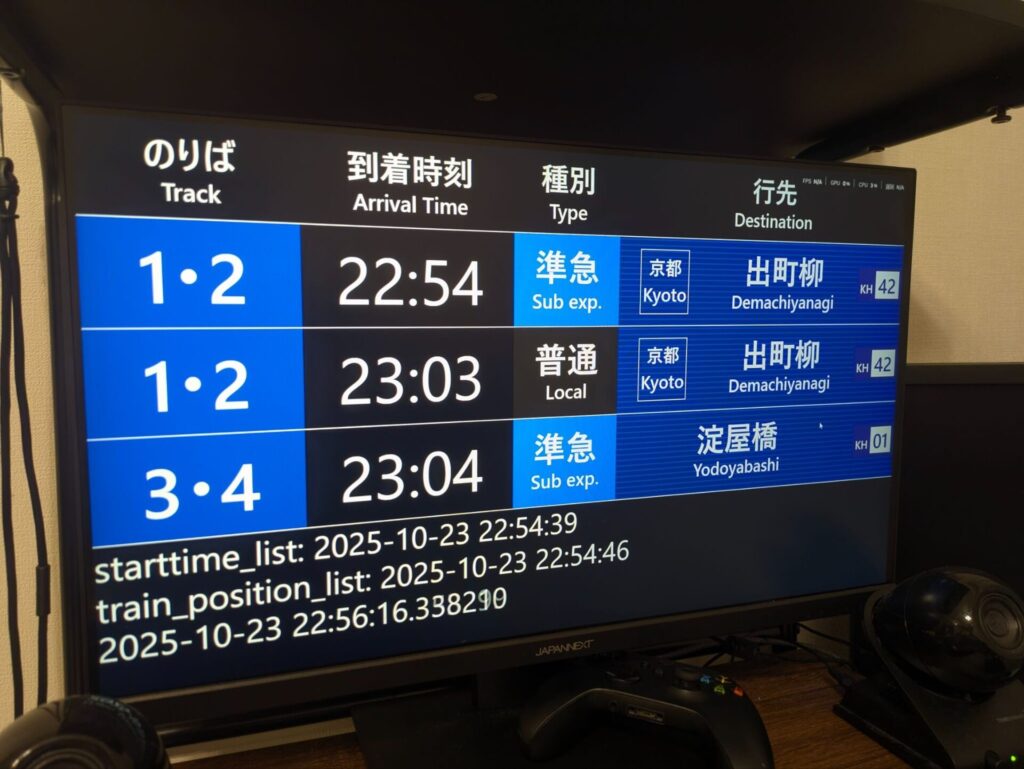
Be careful: reproducing it for public display could amount to copyright infringement.
Notes and Disclaimer
Finally, let me lay out the caveats that come with this kind of unofficial analysis.
- This isn't an official API. The endpoints used here are internal implementation details of a public page, and there's no guarantee the structure won't change without notice. In fact, the coordinate-to-station conversion depends heavily on how the route map happens to be drawn, so it will need to be rewritten if the route map is ever redesigned.
- Be mindful of request frequency. To avoid putting load on the server, the library has a default built-in rate limit of 15 seconds. Keihan's own data also only updates once a minute, so there's no point polling more frequently than that.
- Whether secondary use is permitted is a separate question. Analyzing this personally or experimentally is a different matter from running it as a public-facing service. If you're considering commercial or public deployment in particular, you'll need to check with the data provider. The operational data from Keihan Bus (BUS NAVI) and Yahoo! Transit is prohibited from commercial secondary use under their terms of service, so I've kept my own use of it within personal-use bounds.
- Use entirely at your own risk.
The library is released under the MIT License. The detailed specification is written up in the repository's README, so take a look if you're interested.
GitHub - dk-butsuri/keihan_tracker: 京阪電車の非公式リアルタイム列車位置APIラッパー · GitHub
京阪電車の非公式リアルタイム列車位置APIラッパー. Contribute to dk-butsuri/keihan_tracker development by creating an account on GitHub.

References
- Osaka Electro-Communication University Programming Club's train operation info board (the example that inspired this; the code here was built independently from scratch)